Manage awards serves as the home page when a conference admin logs into the platform. This is where all active and archived awards can be viewed, edited and phases adjusted. Here we breakdown the different options available.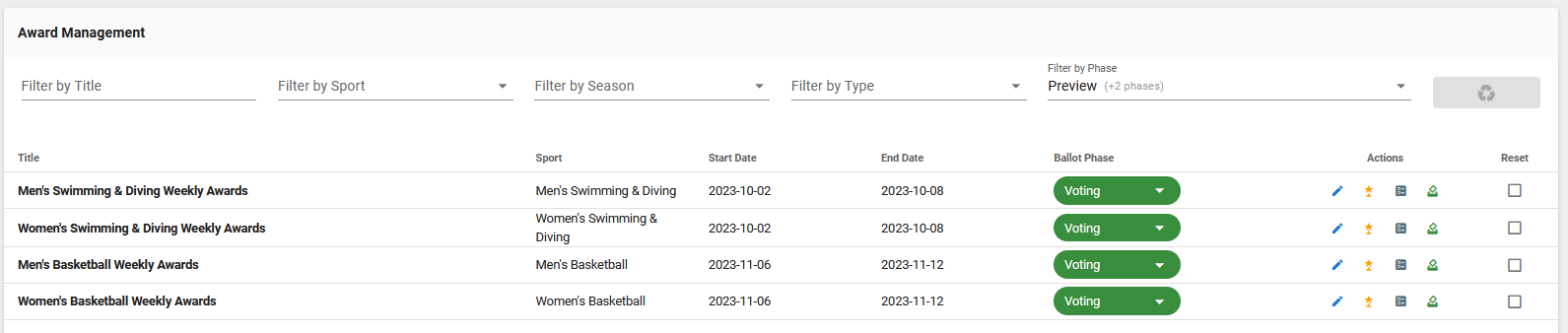
At the top of the manage awards area are filters which allow the conference admin to location specific ballots/awards.
By Title: Enter words that are contained in the title of the award.
By Sport: Choose from available sports to filter.
By Season: Choose from available seasons to filter.
By Type: Choose between the award types: Preseason, Postseason and Weekly.
By Phase: Defaults to Preview, Nomination and Voting, this can also be used to view archived awards.
Below the filters are a list of all the awards that meet the criteria show by title, sport, start and end date (which is for the stats being pulled and not the awards start and end), phase and then the action buttons.
Ballot Phase
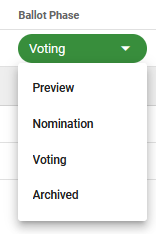
Clicking on the ballot phase title allows you to manually adjust the phase of an award.
Note: Doing a manual change will turn off the auto-phase shifting.
Action Buttons
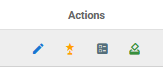
Blue Pencil: Used to edit an existing award.
Orange Start: Displays all the nominations that have been made.
Gray Paper: Allows the conference admin to view the ballot at any point.
Green Icon: Displays all votes that have been cast.
Resetting an Award
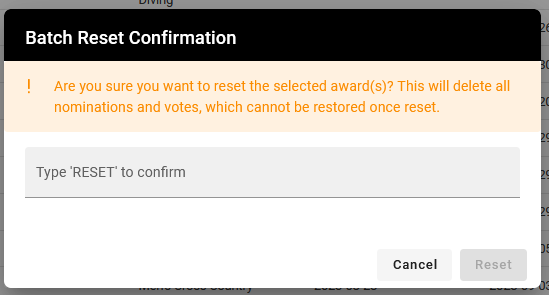
All the way to the right are check boxes under the header “reset”. This allows for you to reset an award which will remove all nominations and votes, most commonly used for weekly awards.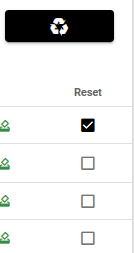
Whether you want to reset one or multiple, click the box and this will activate the recycle button above. When ready, click the recycle button and then you will need to type RESET into the dialogue window.
Was this article helpful?
That’s Great!
Thank you for your feedback
Sorry! We couldn't be helpful
Thank you for your feedback
Feedback sent
We appreciate your effort and will try to fix the article