This menu gives user the ability to add or edit games in existing schedules -
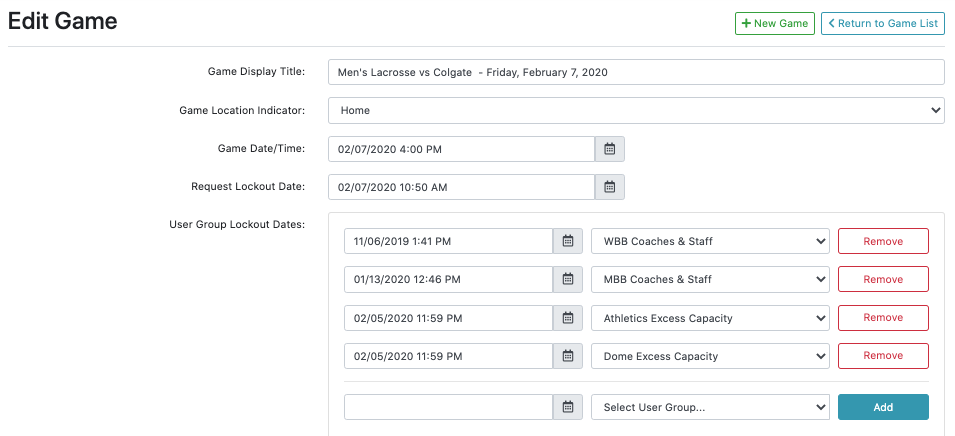
Game Location Indicator: Home, Away or Special (conference tournament or NCAA Tournament game)
Game Date/Time: Actual date and time of game
Request Lockout Date: Calendar date and time that requests can no longer be made after
User Group Lockout Dates: Adjust the lockout date and time for specific groups, which will override the 'request lockout date' setting.
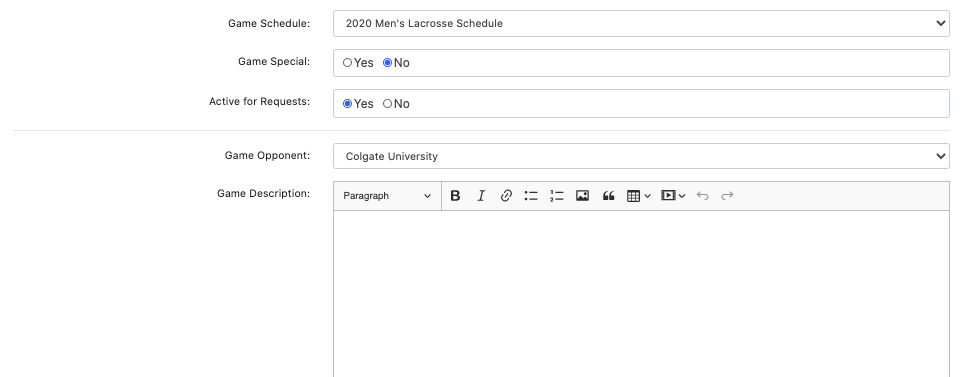
Game Special: Games that take place during the post-season, such as the conference tournament or NCAA Tournament game(s)
Active for Requests: Game is visible and selectable for ticket requests for users on the frontend
Was this article helpful?
That’s Great!
Thank you for your feedback
Sorry! We couldn't be helpful
Thank you for your feedback
Feedback sent
We appreciate your effort and will try to fix the article