1.) OPTION 1 DakStats + SIDEARM File Distributor
Here is a brief walkthrough on how to push an XML file from DakStats to SIDEARM Live Stats
https://www.daktronics.com/Web%20Documents/DakStats/ED-17019.pdf
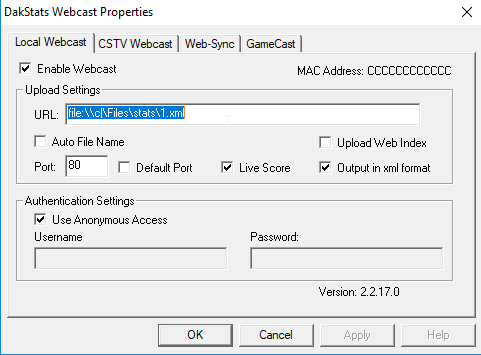
In the Webcast menu of DakStats, you go to configure. Then you would type something like this in place:
```file:\\c|\Files\stats\1.xml```
That will drop a file to your local machine and have that file named 1.xml so you don't have to know the file name. Then use the SIDEARM File Distributor to push it to us and you'll be good to go.
The settings in configure should look something like this:
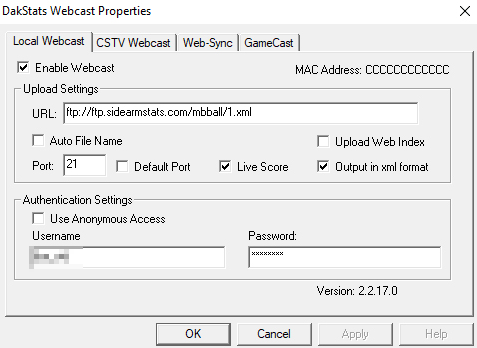
2.) OPTION 2 Push Natively through DakStats (courtesy of Nicholas Robinson at John Brown University)
Settings screenshot is below to send stats to SIDEARM Live Stats natively out of Dakstats
Was this article helpful?
That’s Great!
Thank you for your feedback
Sorry! We couldn't be helpful
Thank you for your feedback
Feedback sent
We appreciate your effort and will try to fix the article