Clients can utilize StatBroadcast to transmit their XML files to SIDEARM for live stats. Directions for setting up XML live stats using StatBroadcast are below:
- In StatBroadcast, select Advanced Settings to set up your FTP destinations
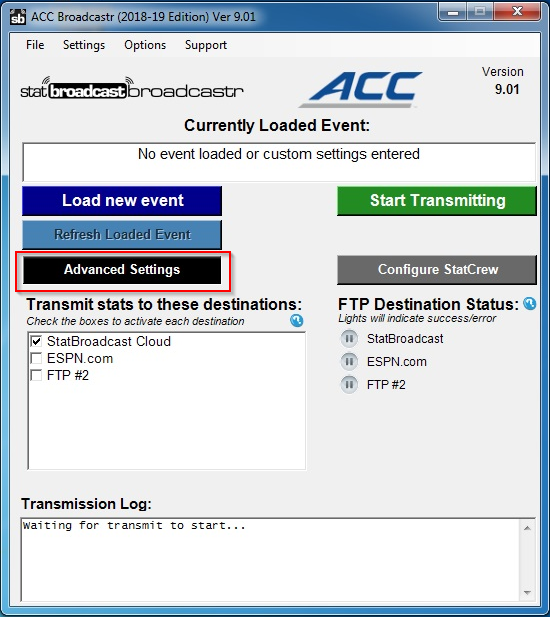
- Once you have opened Advanced Settings, select FTP Destinations
- Title: We recommend naming it SIDEARM
- Server: sidearmstats.com
- Remote Folder: Enter the sport directory. Check the following page for a full list of our directories. Sport directories
- File Name: Make sure this is named 1.xml, not just 1
- Username and Password: Enter the username and password provided by SIDEARM. Note: These credentials remain the same for all sports, each season.
- Check Passive
- Save
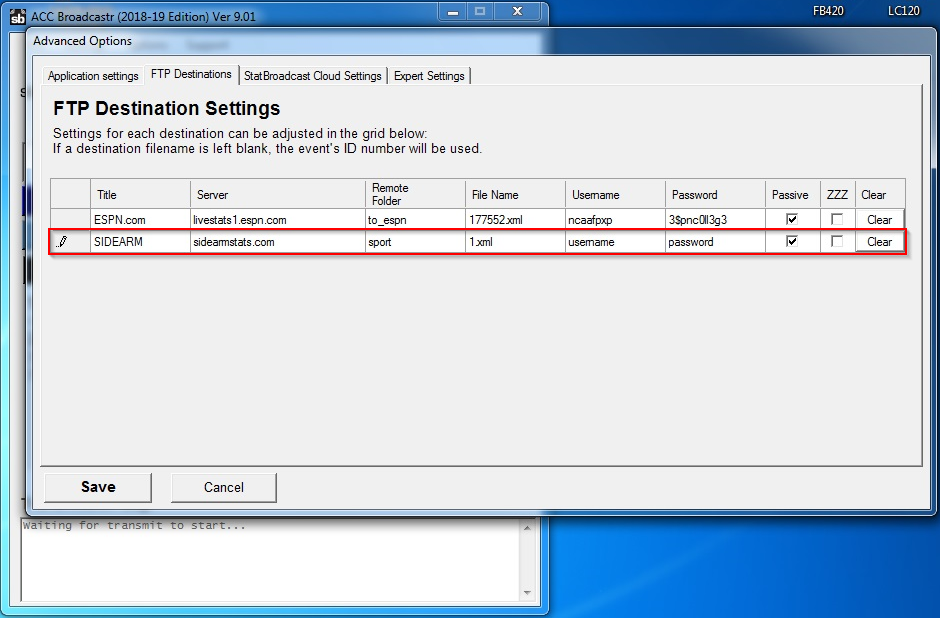
Once that information is input, you should be able to select SIDEARM as an option to “Transmit stats to these destinations”
Was this article helpful?
That’s Great!
Thank you for your feedback
Sorry! We couldn't be helpful
Thank you for your feedback
Feedback sent
We appreciate your effort and will try to fix the article