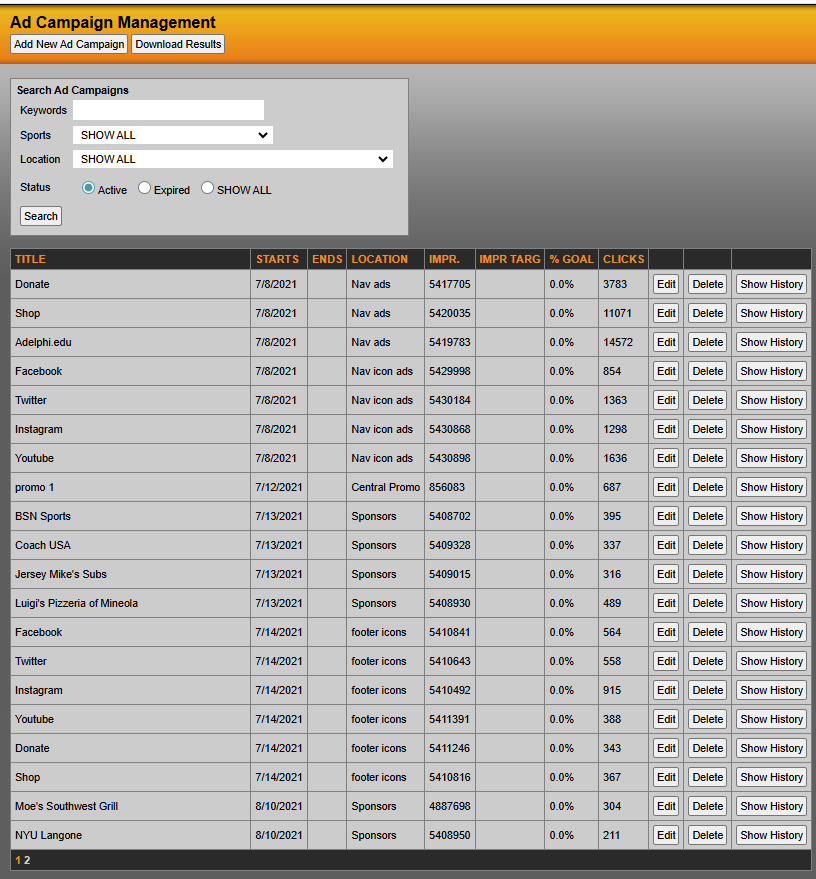
If you navigate to Promotional Items on the left navigation menu, then click on Ads/Promos, you will see all existing ads in the system and can Add New Ad Campaign, Download Results or you can Edit/Delete existing ads.
You will also see the title of the ad, the start and end date, location, impressions (IMPR), impression targets (IMMP TARG), % Goal and click. You also have the ability to see history of campaign.
Here you will also be able to search via keywords, specific sports and locations where the ad is displayed and the status of the ad. You can also filter the status of ads between active, expired or all (both active/inactive campaigns).
Was this article helpful?
That’s Great!
Thank you for your feedback
Sorry! We couldn't be helpful
Thank you for your feedback
Feedback sent
We appreciate your effort and will try to fix the article