To ad a new ad/promotional item to your site go to promotional items > ads/promos > add campaign.
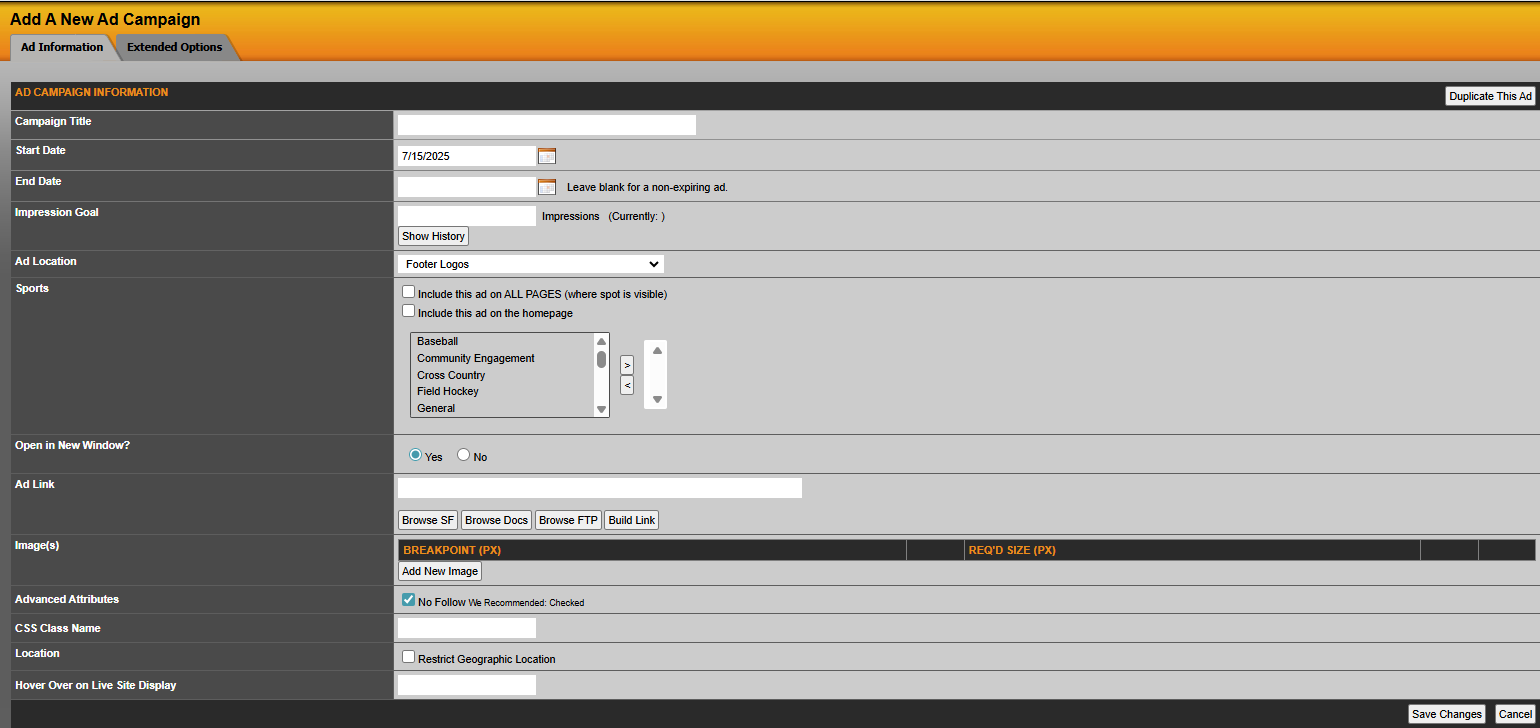
The fields that are available are:
- Campaign Title (for example: SIDEARM Rocks).
- Start Date (place date you want ad to start appearing on the front end of the site and you can also include a start time. This should be formatted MM/DD/YY 12/28/2007, if you would like to add a start time format such as 11:00 PM or AM).
- End Date (place date you would like the campaign to end. This should be formatted MM/DD/YY12/28/2007, if you would like to add an end time format such as 11:00 PM or AM).
- Impression Goal (place the number of impressions you want the ad to have before it expires).
- Ad Location (select where you would like the ad/promo to be displayed on the front end of the site in the pull down menu. These areas are predetermined in the design phase of the website).
- Sports (choose from several options such as: include this ad on ALL PAGES (where spot is visible, include this ad on the homepage, or you can choose what sport pages you would like the ad to appear on).
- Open in New Window? (if a link is added for this ad, would you like the link to open in a new window).
- Ad Link (administrators have the option of linking the ad to a specific URL (include full URL http://), to a sportsfile, document, file on the FTP or build a link from within the site).
- Image (click on choose image link to browse current images in the database or you can upload a new image for the current ad/promo you are adding to SIDEARM).
- CSS Class Name (for SIDEARM admin use only).
Once you have all the necessary fields completed click Save Changes.
Was this article helpful?
That’s Great!
Thank you for your feedback
Sorry! We couldn't be helpful
Thank you for your feedback
Feedback sent
We appreciate your effort and will try to fix the article