Under the schedule and roster sections in the SIDEARM back end, you will find a ‘Set Default Template’ option. Here, you can activate any of our new or current templates for a single sport or all sports. To compare, easily preview each one prior to making it live.
Bio Template 1
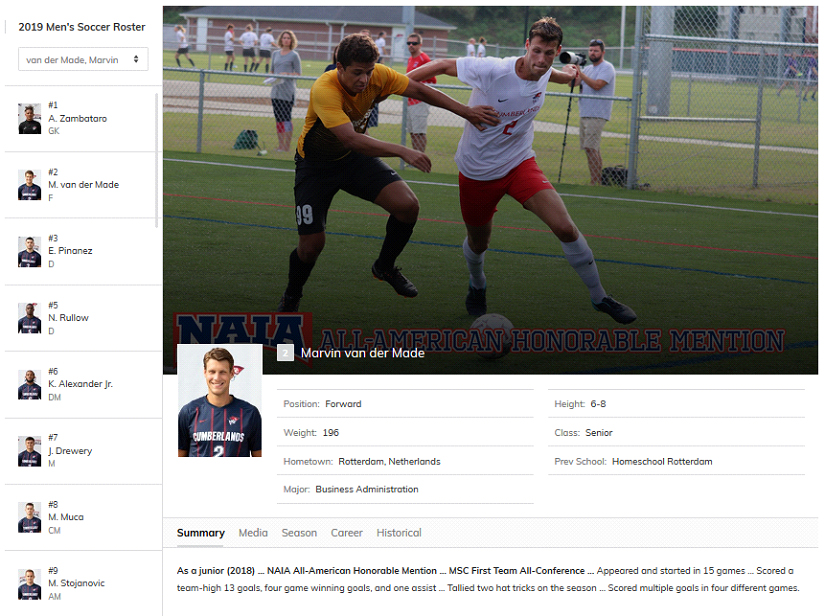
The first new feature of this design brings the roster dropdown to the left of the page. We display the full roster with headshots, names and position info. This makes it even easier for fans to navigate between players.
In the bio area, we have split the stats into separate tabs for season and career, a change that has been highly requested from your feedback! We now include season and career stat snapshots, so you can easily see an “average” before navigating into the full stat tabs.
Bio Template 2
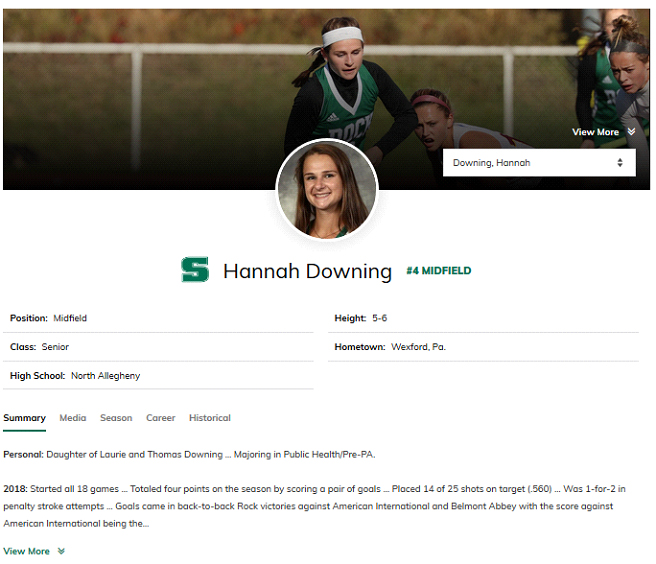
The second bio option offers a few tweaks to the default layout, sticking with a dropdown for the roster list, which now sits on top of a minimized player action photo. Fans have the option to expand the image, but this will allow for more content to be displayed before scrolling. The circular player headshot resides in the center of the page.
The rest of the page sticks to the new “two tab” format for stats mentioned in Template 1 while featuring some related media below that. This version could be ideal for sports without stat integrations, such as swimming or track.
Was this article helpful?
That’s Great!
Thank you for your feedback
Sorry! We couldn't be helpful
Thank you for your feedback
Feedback sent
We appreciate your effort and will try to fix the article